
Hospital Management System: A Complete Guide with Modules, ER Diagram and Use Case Diagram
What Is a Hospital Management System?
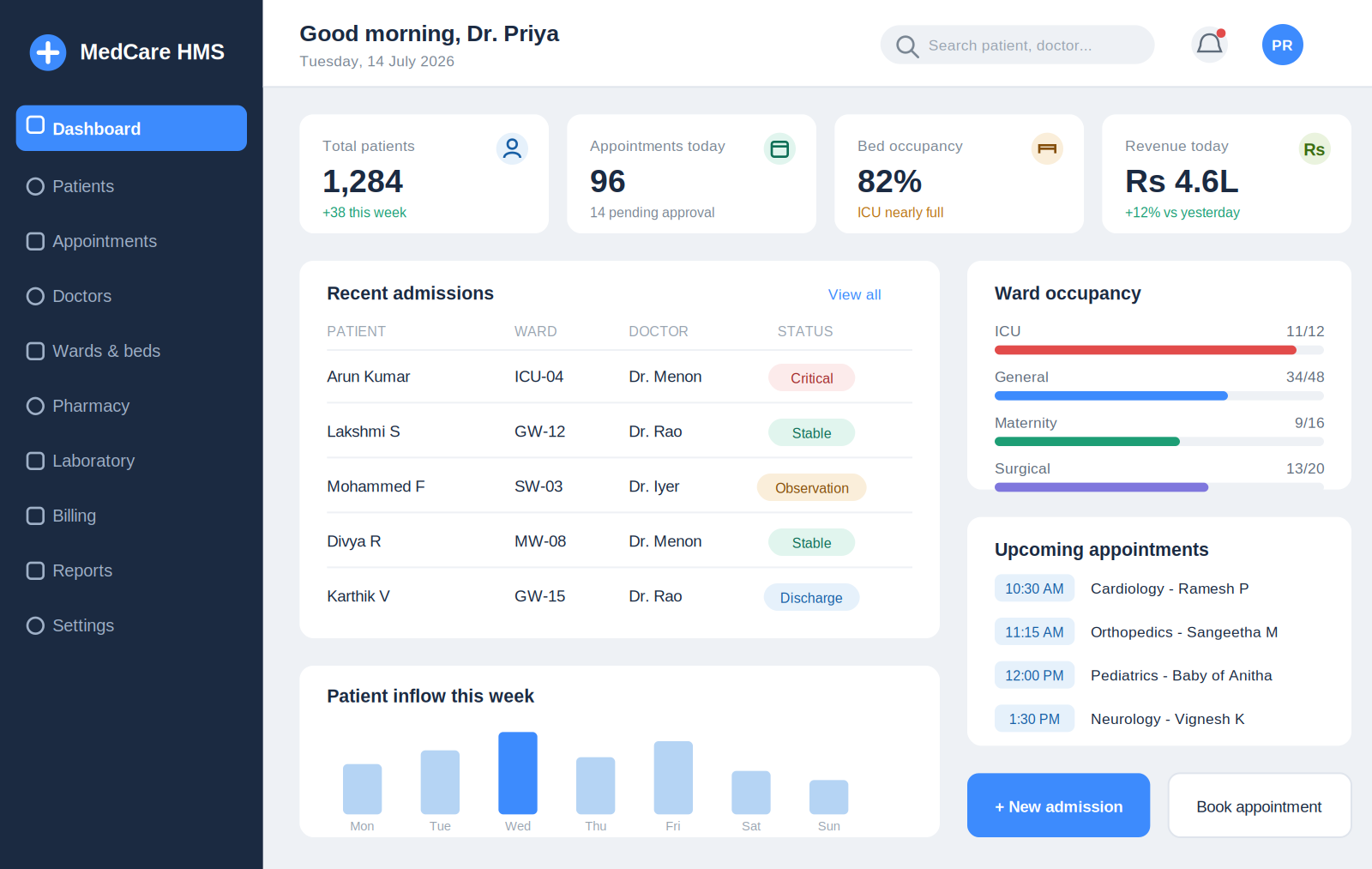
A hospital management system (HMS) is software that runs the daily work of a hospital in one place. It handles patient registration, appointments, billing, pharmacy, lab reports, and medical records. Instead of paper files and separate registers, staff use one system. Doctors see patient history in seconds. Billing happens without errors. Reports are ready when the admin needs them.
Think of it like the brain of the hospital. Every department talks to it, and it keeps everything connected.
Quick Answer Summary
In short: A hospital management system is a single software platform that manages patients, doctors, appointments, billing, pharmacy, labs, and records. It replaces paper work, cuts errors, speeds up patient care, and gives hospital owners clear reports. Small clinics and large multi-specialty hospitals both use it to save time and money.
HMS vs HIS vs HMIS: What Is the Difference?
You will see three names used for hospital software. They overlap a lot, but here is the simple difference:
| Term | Full Form | Focus |
|---|---|---|
| HMS | Hospital Management System | Daily operations: billing, appointments, pharmacy, staff |
| HIS | Hospital Information System | Data and information flow: records, lab results, reports |
| HMIS | Hospital Management Information System | Both operations and information, plus analytics for decisions |
In real life, most modern software does all three jobs. When a hospital in India asks for an "HIS system in hospital" or an HMIS, they usually mean the same complete platform. So do not worry too much about the label. Look at the modules instead.
Key Modules of a Hospital Management System
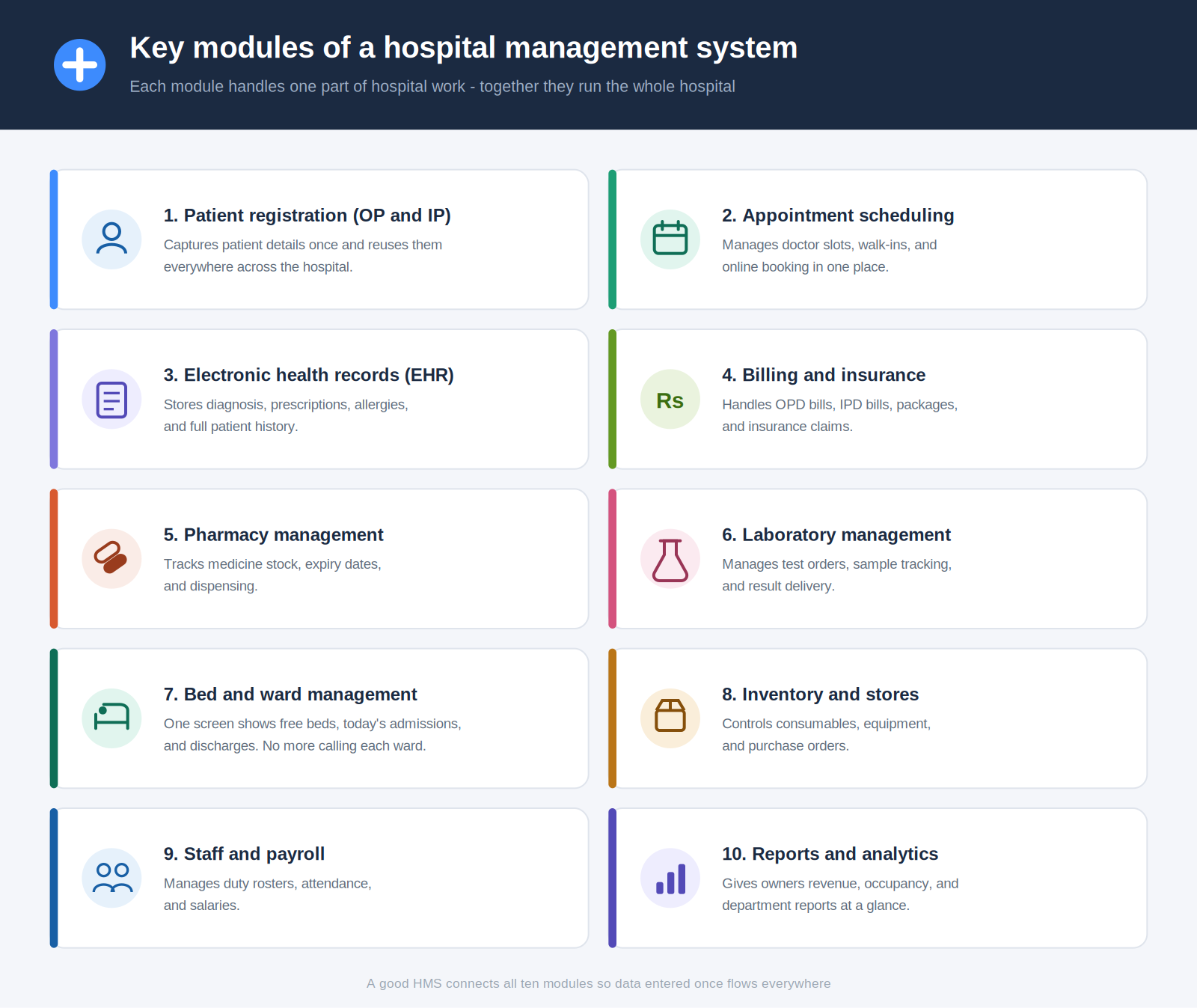
A good HMS is built from modules. Each module handles one part of hospital work. Here are the ones that matter most:
What Is OP Registration in HMIS?
OP registration means outpatient registration. It is the first step when a patient visits a hospital without being admitted. In an HMIS, OP registration works like this:
- The front desk enters the patient's name, age, contact, and ID.
- The system creates a unique patient ID (UHID).
- The patient picks a department and doctor.
- The system assigns a token or appointment slot.
- A registration fee is billed and a receipt prints instantly.
The whole process takes under two minutes. Repeat visits are even faster because the UHID pulls up the full record. This one module alone removes the biggest queue in most Indian hospitals.
Electronic Health Records Software: The Heart of Every HMS
Electronic health records software stores every patient's medical story in digital form. Diagnosis notes, lab results, scans, prescriptions, and allergies all live in one secure file. Any authorized doctor can open it in seconds.
Why it matters:
- No lost files or unreadable handwriting
- Doctors see full history before treating
- Drug interaction and allergy alerts protect patients
- A fire or a flood cannot wipe out patient history, because copies live safely in the cloud and only the right staff can open them
- Hospitals meet data rules like India's ABDM standards
EHR is a deep topic on its own. We cover features, pricing models, and compliance in detail in our guide to electronic health records software.
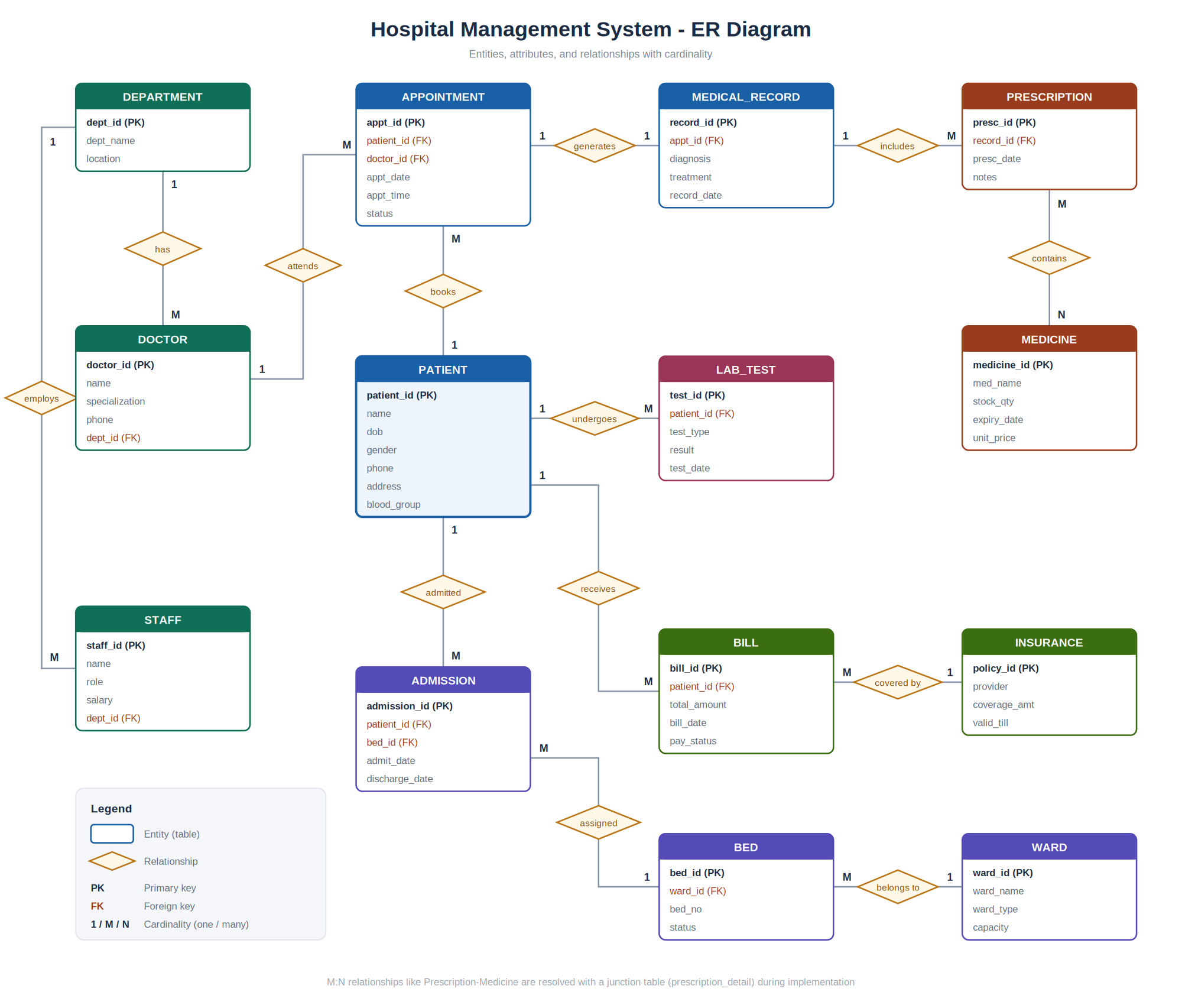
ER Diagram for Hospital Management System
An ER diagram (entity relationship diagram) shows how data is organized inside the hospital database. Students building an HMS project and developers designing real systems both start here.
The main entities in a hospital management system ER diagram are:
Pro tip from our development team: In real projects, always separate the Appointment and Consultation entities. Appointments get cancelled and rescheduled. Consultations are medical events. Mixing them is the most common design mistake we fix in student projects and legacy systems.
Use Case Diagram for Hospital Management System
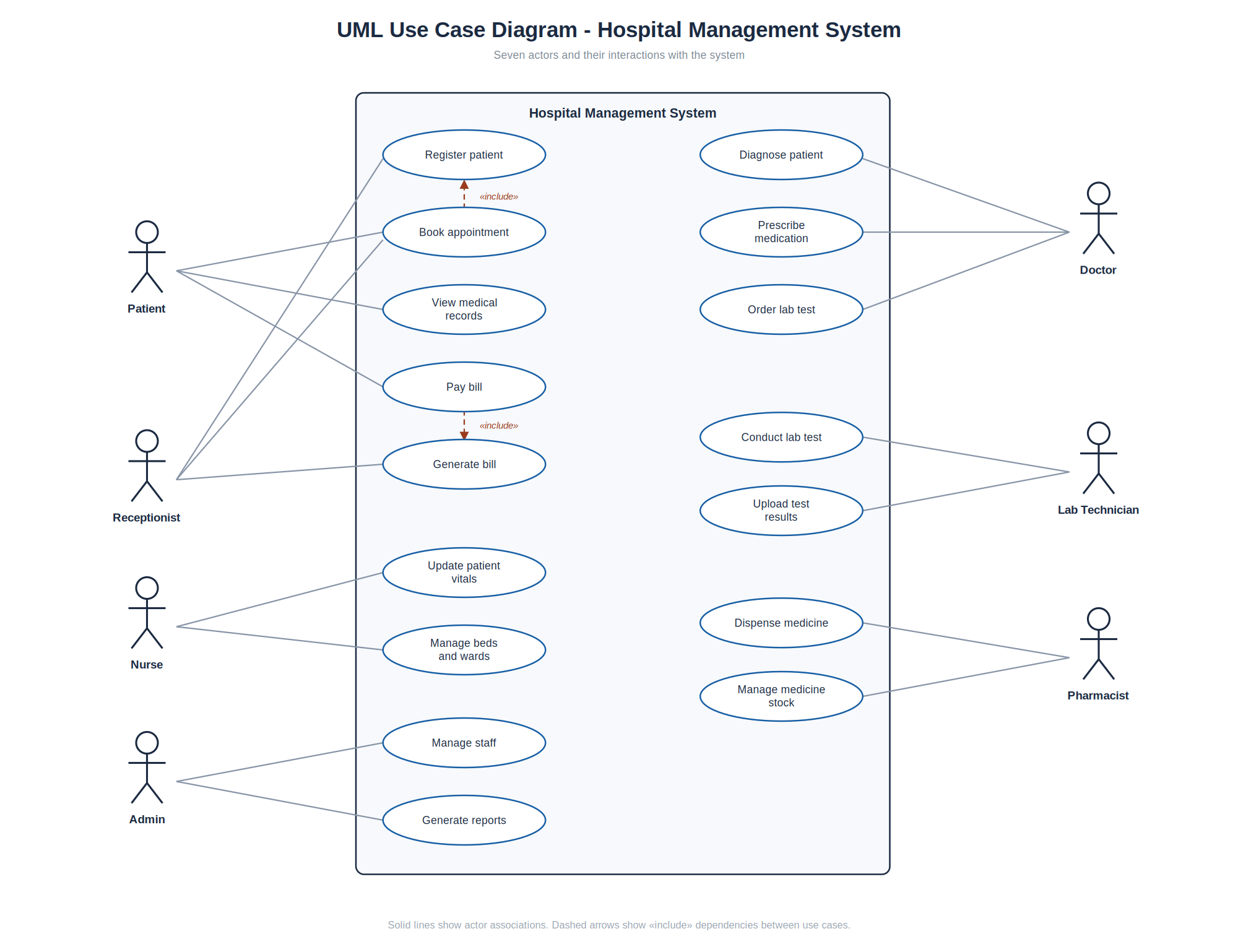
A use case diagram in UML shows who uses the system and what they do with it. It is the second diagram every HMS project needs.
Actors in a hospital management system use case diagram:
- Patient
- Receptionist
- Doctor
- Nurse
- Pharmacist
- Lab Technician
- Admin
Main use cases:
| Actor | Use Cases |
| Patient | Register, book appointment, view reports, pay bill |
| Receptionist | Register patient, schedule appointment, generate bill |
| Doctor | View patient history, add diagnosis, write prescription, order tests |
| Nurse | Update vitals, manage ward, track medication |
| Pharmacist | Dispense medicine, update stock |
| Lab Technician | Receive test order, upload results |
| Admin | Manage staff, view reports, configure system |
How to Plan a Hospital Management System Project
Building an HMS project? Here is the path our team follows, whether it is a college project or a live hospital deployment:
- Gather requirements. Talk to real hospital staff. List every workflow.
- Design the database. Start with the ER diagram above. Normalize your tables.
- Draw the use case diagram. Confirm every actor and action is covered.
- Pick the tech stack. Common choices: React or Angular front end, Node.js or Java or PHP back end, MySQL or PostgreSQL database.
- Build module by module. Start with registration and appointments. Add billing next. Pharmacy and lab come after.
- Test with real scenarios. Duplicate patients, cancelled appointments, partial payments.
- Plan security first, not last. Role-based access, encrypted data, audit logs.
For a college project, modules 1 to 4 with registration, appointment, and billing are enough to score well. For a real hospital, you need all modules plus compliance, backups, and training.
Benefits of a Hospital Management System
- Faster patient care: Registration and billing in minutes, not hours
- Fewer errors: No manual entry mistakes in bills or prescriptions
- Lower costs: Less paper, fewer staff hours on admin work
- Better decisions: Live reports on revenue, occupancy, and departments
- Happier patients: Short queues, online booking, digital reports
- Data safety: Backups and access control instead of storerooms of files
Hospitals we work with report up to 90 percent reduction in manual paperwork after moving to a digital system.
Common Mistakes Hospitals Make
- Buying modules they do not need. A 30-bed hospital does not need enterprise radiology integration on day one.
- Skipping staff training. The best software fails if the front desk does not use it.
- Ignoring data migration. Old patient records must move into the new system cleanly.
- Choosing price over support. Cheap software with no local support costs more within a year.
- No backup plan. One power failure without backups can erase years of records.
How to Choose the Right Hospital Management Software
Ask these questions before you buy:
- Does it cover OP, IP, pharmacy, lab, and billing in one system?
- Is it cloud-based so you can access it from anywhere?
- Does it support regional languages for front desk staff?
- Can it integrate with lab machines and payment gateways?
- Is support available in your city and time zone?
- Does the vendor offer training and data migration?
If you run a smaller setup, a clinic management system may fit better than a full HMS. Match the software to your size, not the salesperson's pitch.
Frequently Asked Questions
1. What is a hospital management system? A hospital management system is software that manages all hospital operations - patient registration, appointments, billing, pharmacy, labs, and records - in one connected platform.
2. What is the difference between HMS and HIS? HMS focuses on daily operations like billing and appointments. HIS focuses on information flow like records and reports. Modern software combines both.
3. What are the main modules of a hospital management system? Patient registration, appointment scheduling, EHR, billing, pharmacy, laboratory, bed management, inventory, staff management, and reporting.
4. What is an ER diagram for a hospital management system? It is a database design diagram showing entities like Patient, Doctor, Appointment, and Bill, and how they relate to each other.
5. What are the actors in a hospital management system use case diagram? Patient, receptionist, doctor, nurse, pharmacist, lab technician, and admin are the standard seven actors.
6. What is OP registration in HMIS? OP registration is the outpatient registration process where a new patient gets a unique ID, picks a doctor, and receives a token, all in under two minutes.
7. What is electronic health records software? EHR software stores patient medical history, prescriptions, lab results, and allergies digitally so doctors can access complete records instantly.
8. Which tech stack is best for a hospital management system project? React or Angular for the front end, Node.js, Java, or PHP for the back end, and MySQL or PostgreSQL for the database are proven choices.
9. How much does hospital management software cost in India? Cost depends on hospital size, modules, and deployment type. Cloud plans start small for clinics and scale up for multi-specialty hospitals. Ask vendors for a demo and quote.
10. Is cloud-based hospital software safe? Yes, when it uses encryption, role-based access, and regular backups. Cloud systems are often safer than local servers with no backup.
11. Can small hospitals and clinics use an HMS? Yes. Clinics often start with a lighter clinic management system and upgrade to a full HMS as they grow.
12. Does hospital software support ABDM in India? Good vendors build for ABDM (Ayushman Bharat Digital Mission) compliance so hospitals can join India's national digital health network.
Conclusion
A hospital management system is no longer optional. Patients expect fast service, and hospital owners need clean data to grow. Whether you are a student designing your first ER diagram or a hospital director replacing paper registers, the fundamentals are the same: clean database design, complete modules, and software your staff will actually use.
Ready to see a hospital management system built for Indian hospitals? Codepluse, based in Coimbatore, has been building healthcare and enterprise software since 2014 with a team of 80+ developers. Book a free demo and see how our hospital management system fits your hospital.